

How to effectively work with Databases in Python
Practical techniques backed by benchmarks for working with Databases effectively in Python

Introduction
The age-old debate on the use of Raw SQL v/s ORM is still very much alive in today’s world. Let’s see some of the comparing points
| Aspect | Raw SQL | ORM (Object-Relational Mapping) |
| Ease of Use | Requires knowledge of SQL syntax and database-specific features. | Abstracts SQL into Python objects, making it easier for those familiar with Python. |
| Flexibility | Offers complete control over the SQL queries and database interactions. | Limited by the ORM's capabilities, but can be extended with raw SQL if needed. |
| Performance | Can be optimized for performance by writing efficient SQL queries. | May introduce overhead due to abstraction, but often optimized for common use cases. |
| Portability | Tied to specific SQL dialects, making it less portable across databases. | Generally more portable as it abstracts database-specific details. |
| Learning Curve | Steeper learning curve for those unfamiliar with SQL. | Easier for Python developers, but it requires learning the ORM's API. |
| Maintenance | Can be harder to maintain due to verbose SQL code. | Easier to maintain as changes in the database schema can be managed through models. |
| Security | Prone to SQL injection if not handled properly. | Provides built-in protection against SQL injection through parameterized queries. |
A seasoned database expert might claim that an ORM or a programming language isn't necessary for working with a database. However, in practice, this approach has significant downsides, such as:
For any complex problem, you might end up with multiple nested
SELECTqueries, which can be really tricky for others to debug and understand.SQLhas a fixed set ofkeywords, so you have to work within those limits. This means missing out on all the amazing possibilities that a full-stack programming language likePythonoffers.You can't build a
data pipelineusing justSQL.
Therefore, the use of SQL should generally be limited to performing data analytics rather than developing data applications.
The World of ORMs
Python being a popular programming language provides many options for ORM. Let’s see them in action
Tech stack
For this article, I am using
Postgresdatabase &Python 3.13Typically, an ORM transforms SQL data into Python
data structures, which are then organized into either adict, atuple(alistoftuples), or even anamedtuple(alistofnamedtuples).These basic data structures may not simplify handling real-world problems.
I prefer using a
Dataframeas the data structure to store the data. ADataframeclosely resembles aDatabase Table.You can choose between
PandasorPolars. Personally, I usePolars. I won't dive into why I preferPolarsoverPandashere, as that's a topic for another time. But trust me, switching toPolarscan really make your life easier!
Benchmark
The environment that I use includes:
Postgres 17Python 3.13Table of size
1,977,823
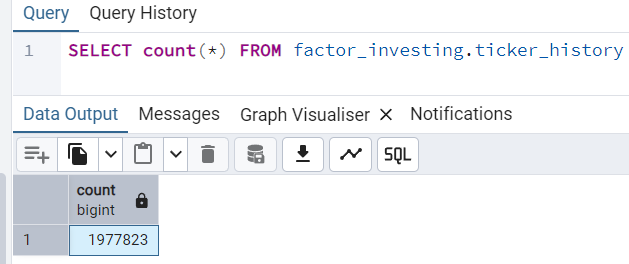
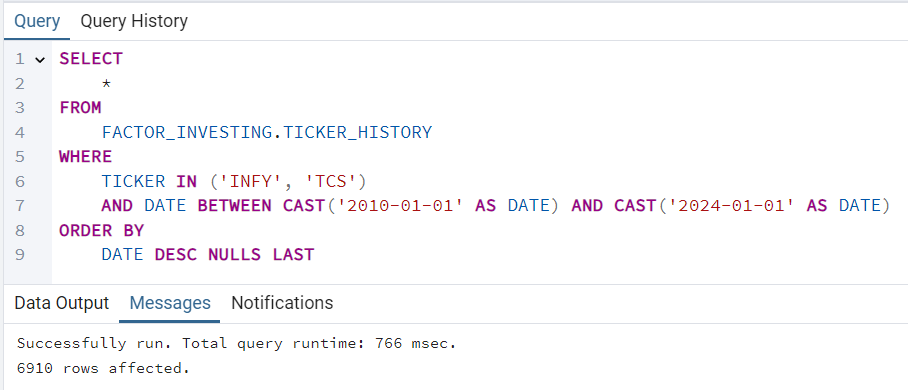
- This is the query
SELECT
    *
FROM
    FACTOR_INVESTING.TICKER_HISTORY
WHERE
    TICKER IN ('INFY', 'TCS')
    AND DATE BETWEEN CAST('2010-01-01' AS DATE) AND CAST('2024-01-01' AS DATE)
ORDER BY
    DATE DESC NULLS LAST
- The Benchmark query returns data of size
6910rows
1. SQLAlchemy + Polars
from datetime import date
from about_time import about_time
from alive_progress import alive_it
from sqlalchemy.orm import declarative_base, mapped_column, Mapped, Session
from sqlalchemy import String, Date, DOUBLE_PRECISION, select, desc, create_engine
import polars as pl


engine = create_engine('postgresql+psycopg://akash:0330@localhost/playground')
Base = declarative_base()

class TickerHistory(Base):
    __tablename__ = "ticker_history"
    __table_args__ = {"schema": "factor_investing", "extend_existing": True}

    date: Mapped[date] = mapped_column(Date)
    ticker: Mapped[str] = mapped_column(String)
    key: Mapped[str] = mapped_column(String, primary_key=True, nullable=False)
    open: Mapped[float] = mapped_column(DOUBLE_PRECISION)
    high: Mapped[float] = mapped_column(DOUBLE_PRECISION)
    low: Mapped[float] = mapped_column(DOUBLE_PRECISION)
    close: Mapped[float] = mapped_column(DOUBLE_PRECISION)

query = (
    select(TickerHistory)
    .where(TickerHistory.ticker.in_(["INFY", "TCS"]))
    .where(TickerHistory.date.between(date(2010, 1, 1), date(2024, 1, 1)))
    .order_by(desc(TickerHistory.date))
)

with about_time() as t:
    with Session(engine) as session:
        # Running the same query 100 times
        for i in alive_it(range(100)):
            # Directly reading query in polars dataframe
            df = pl.read_database(query, session)

print(f"Total time taken: {t.duration_human}")
The result

So that’s 44.41 second for 100 queries & 2.25 queries per second throughout
2. Pony ORM, Peewee ORM, SQLModel ORM
Both of these popular ORMs currently do not support Psycopg3 and still require Psycopg2. The library authors recommend using Psycopg3 going forward, as mentioned here. Because of this, I decided to skip using both of these ORMs.
SQLModel ORM which is itself based on SQLAlchemy, so we won't any significant difference in results.
But this is not the end of the tunnel. There are other potentially good options too. Let’s check them out
You may have already got a feeling that I prefer ORM based solution compared to Raw SQL. But theoretically, Raw SQL query execution should have an edge over ORM execution.
To combine the power of both the world I use
Sqlglot Library. This allows you to build the query programmatically as well as iteratively. Eliminates issues like typos/spelling errors, SQL Injection, etc. It supports 24 dialects.
3. Psycopg3 + Sqlglot + Polars
from datetime import date
from about_time import about_time
from alive_progress import alive_it
from psycopg import connect
import polars as pl
from sqlglot import select, condition, Dialects

query = (
    select("*")
    .from_("factor_investing.ticker_history")
    .where(condition("ticker").isin("INFY", "TCS"))
    .where(condition("date").between(date(2010, 1, 1), date(2024, 1, 1)))
    .order_by("date DESC")
    .sql(Dialects.POSTGRES)
)

conn = connect(
    host="localhost", port=5432, dbname="playground", user="akash", password="0330"
)

with about_time() as t:
    print("Starting benchmark...")
    with conn.cursor() as cursor:
        # Running the same query 100 times
        for i in alive_it(range(100)):
            # Directly reading query in polars dataframe
            df = pl.read_database(query, cursor)

print(f"Total time taken: {t.duration_human}")

So that’s 20.04 second for 100 queries & 5 queries per second throughout. This improves the result compared to SQLAlchemy.
4. ADBC + Sqlglot + Polars
Polars dataframe are backed by Arrow Table & uses PyArrow. Use of ADBC (Arrow Database Connectivity) can benefit from zero copy concept, since Polars doesn't need to convert table data returned by ADBC drivers.
from adbc_driver_postgresql.dbapi import connect
from datetime import date
from about_time import about_time
from alive_progress import alive_it
import polars as pl
from sqlglot import select, condition, Dialects

query = (
    select("*")
    .from_("factor_investing.ticker_history")
    .where(condition("ticker").isin("INFY", "TCS"))
    .where(condition("date").between(date(2010, 1, 1), date(2024, 1, 1)))
    .order_by("date DESC")
    .sql(Dialects.POSTGRES)
)

uri = "postgresql://akash:0330@localhost/playground"

with about_time() as t:
    with connect(uri) as conn:
       # Running the same query 100 times
        for i in alive_it(range(100)):
            # Directly reading query in polars dataframe
            df = pl.read_database(query, conn)

print(f"Total time taken: {t.duration_human}")

So that’s 17.94 second for 100 queries & 5.68 queries per second throughout. This improves the result compared to both SQLAlchemy & Psycopg
5. ConnectorX + Sqlglot + Polars
ConnectorX is yet another SQL driver/library that is making some rounds. It is using Rust. Let’s see in action. BTW it uses a slightly different approach. There is no connection or cursor concept here.
 from datetime import date
from about_time import about_time
from alive_progress import alive_it
import polars as pl
from sqlglot import select, condition, Dialects

query = (
    select("*")
    .from_("factor_investing.ticker_history")
    .where(condition("ticker").isin("INFY", "TCS"))
    .where(condition("date").between(date(2010, 1, 1), date(2024, 1, 1)))
    .order_by("date DESC")
    .sql(Dialects.POSTGRES)
)

uri = "postgresql://akash:0330@localhost/playground"
with about_time() as t:
    # Running the same query 100 times
        for i in alive_it(range(100)):
            # Directly reading query in polars dataframe
            df = pl.read_database_uri(query,uri, engine="connectorx")

print(f"Total time taken: {t.duration_human}")

So that’s 1:22.4 second for 100 queries & 12.1 queries per second throughout. This is the worst of the lot.
Conclusion
The thought that Raw SQL can give you better results holds true. But at the same time directly using it in Python will be never a good idea.
Sqlglot nicely fits this scenario. Allows us to use Raw SQL query & combine with Dataframe.
In terms of benchmarks, the combination of ADBC + Sqlglot + Polars is the winner because of the tight Arrow Integration. So this should be your first pick.
But at the same time sticking with Psycopg is also not a bad idea.


